What is an automated webinar?
An automated webinar is a pre-recorded session that runs on a schedule with no presenter. How it works, what it suits, where it falls short, and what you need.
 By Josh Miller
 Josh MillerFounder, WebinarStackJosh built and ran an online course business that sold through automated webinars. He founded WebinarStack to be the webinar platform he wanted and could not buy.@joshmili on Instagram (opens in a new tab)Full bio
An automated webinar is a pre-recorded presentation that plays on a schedule, or minutes after someone registers, for each registrant. Registration, reminders, timed polls, chat and offers, and follow-up all run without a presenter. It is also called an evergreen webinar, because it can run every day without being re-presented.
How does an automated webinar work?
An automated webinar runs as five steps that happen without you.
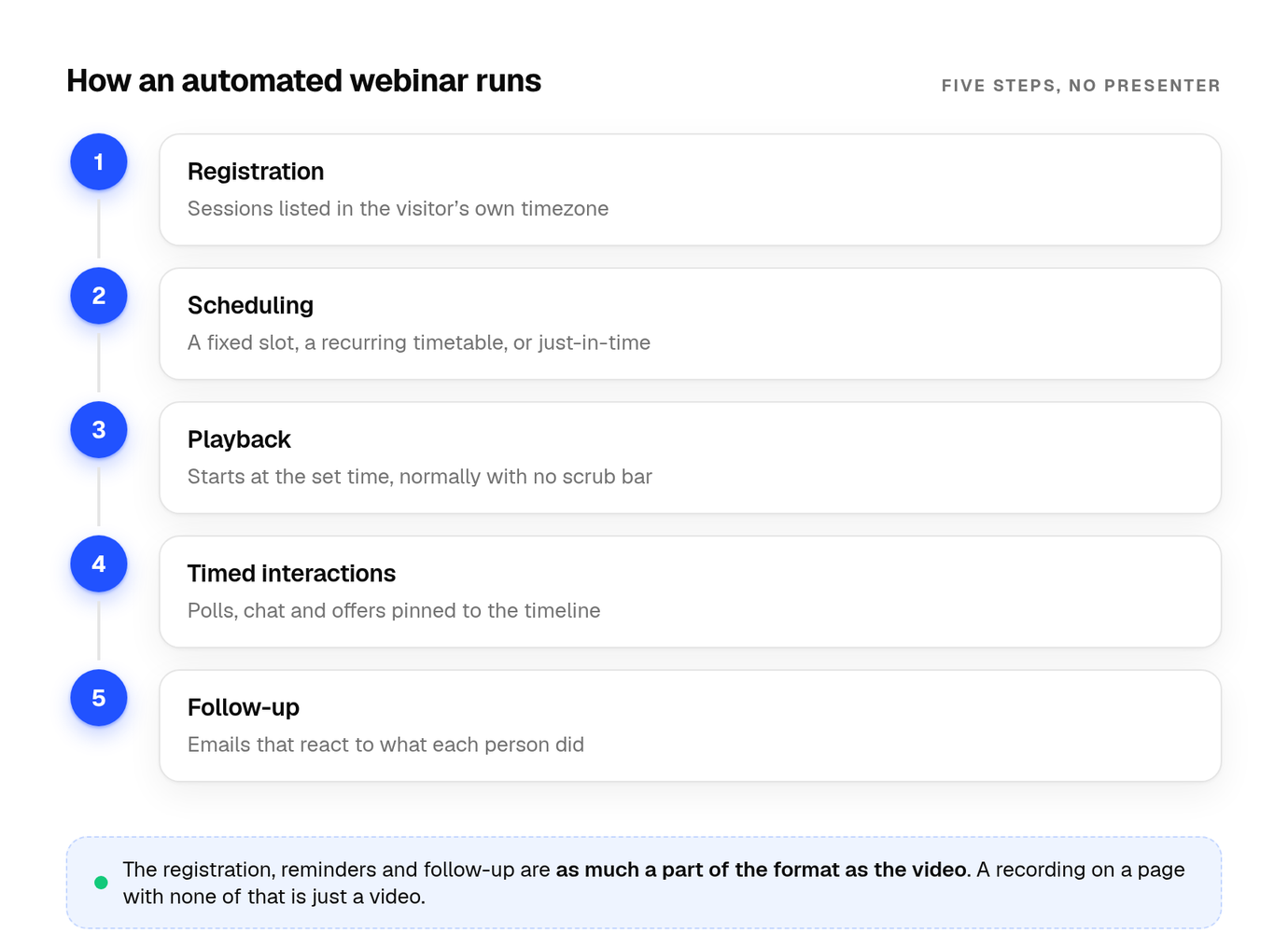
- Registration. A visitor signs up on a page that lists the next available sessions, shown in their own timezone.
- Scheduling. The session is attached to a time. That can be a fixed slot (every Tuesday at 7pm), a recurring timetable, or a start a few minutes after registering, which is the just-in-time format.
- Playback. At the start time the recording plays from the beginning for that attendee. A scheduled session is normally played without a scrub bar, so it behaves like an event, not a video to skip through.
- Timed interactions. Polls, chat messages and offers are pinned to points on the timeline, so they appear at the same moment for every attendee.
- Follow-up. Emails and other actions go out after the session, ideally based on what each person did, not on a single blast to everyone.
The registration, reminders and follow-up are as much a part of the format as the video. A recording on a page with none of that is just a video.
What is the difference between automated, on-demand and live webinars?
A live webinar is presented in real time at one fixed date. An on-demand webinar is a recording anyone can start at any moment. An automated webinar sits between them: a recording, but with a start time and a session around it.
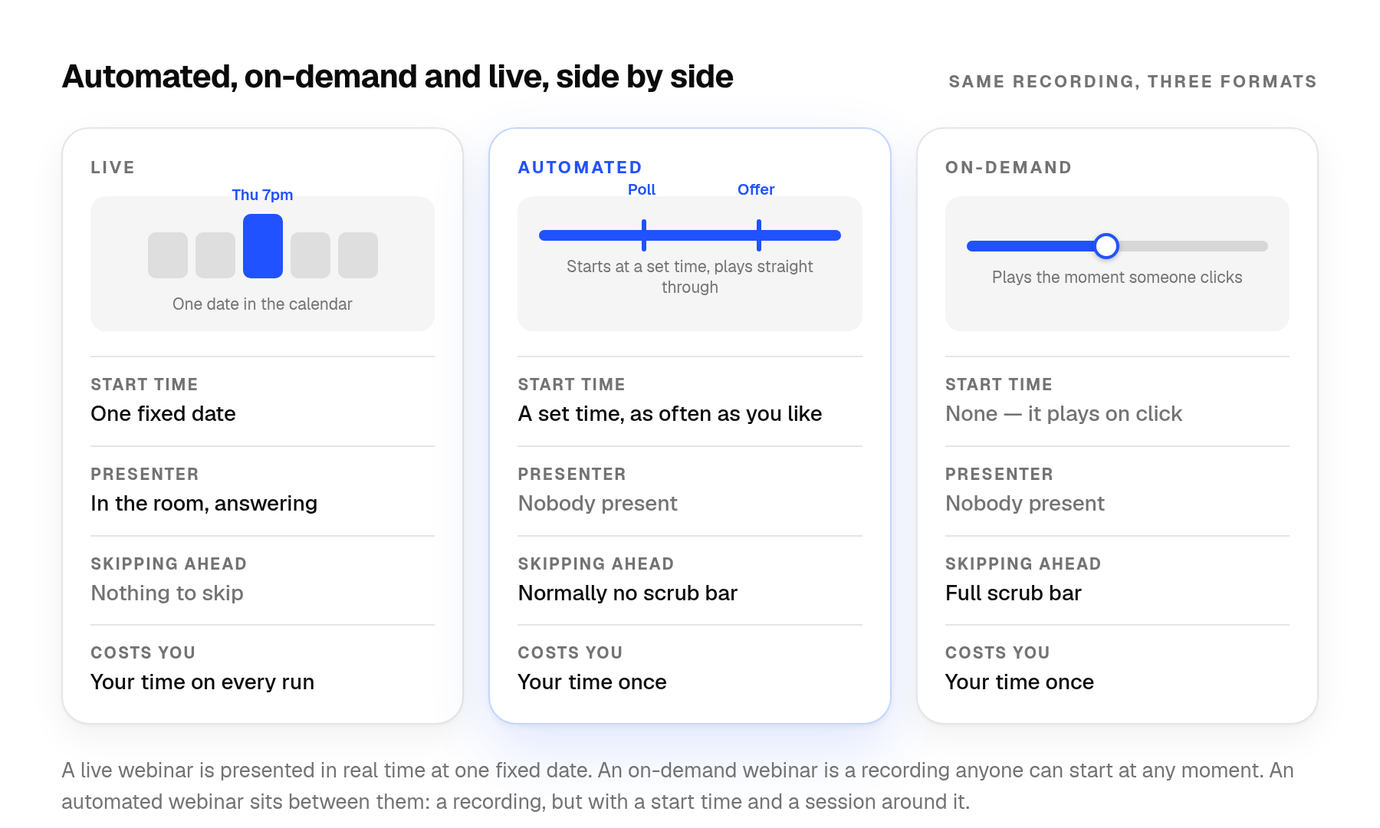
Live. A person presents, answers questions as they arrive, and can change direction depending on the room. It costs a presenter's time for every run and it can only be attended at one time.
On-demand. The visitor clicks and it plays immediately, with a scrub bar and no schedule. It is the lowest-friction option and the weakest at holding attention, since nothing says it has to be watched now.
Automated. The recording starts at a set time, plays without being skipped through, and carries timed interactions and follow-up. Attendees treat it as an appointment, and you do not have to be there.
For a fuller comparison of the choices, see the roundup of the best automated webinar software for course creators.
What are automated webinars good for, and what are they bad at?
Automated webinars are good at selling a stable offer to a steady flow of traffic, and bad at anything that depends on the presenter being there.
They suit a course, a coaching programme or a membership that you sell all year from a presentation that does not change much. You record it once, point paid or organic traffic at it, and every registrant gets the same session. Because the offers and follow-up are scheduled, you can see exactly which minute people left and who clicked.
They are a poor fit in four cases:
- Live Q&A. Attendees cannot ask a recording a question and get an answer. If the questions are the value, run it live or add a live session on top.
- Fast-changing content. A recording goes stale. If the material changes monthly, you will be re-recording monthly.
- Launches. A cart-open window, a bonus that expires on a date and a presenter who is visibly there all argue for a live event.
- Your first presentation. If you have never given the talk, run it live a few times first. You will find out what people ask and where they drift, and that is what you want to record.
Is it honest to run a pre-recorded webinar?
Yes, provided you never tell attendees a recording is live. Calling a session "automated" or "replay", or saying it starts in ten minutes, is accurate. Calling it live when nobody is presenting is a misrepresentation, and in several jurisdictions it counts as an unfair commercial practice.
It is also a practical problem. Attendees notice a presenter who does not respond to the chat or who greets the wrong timezone, and they stop trusting the offer that follows. Honest framing costs little attendance, and it removes the risk of getting caught. The same position holds for the just-in-time format.
What do you need to run an automated webinar?
You need five things, and the recording is the easy one.
- A recording of the presentation, hosted on a video platform or the webinar tool's own hosting.
- A registration page that shows session times in each visitor's timezone.
- A schedule. Fixed times, a recurring timetable or just-in-time starts.
- Interactions on the timeline: a poll, a few chat messages and at least one offer, each pinned to a timestamp.
- Follow-up that reacts to behaviour. At minimum, one email for people who watched and a different one for people who did not show up.
The last item is where most setups are thin. Plenty of tools will play a recording on a timetable. Fewer can tell you who watched to the offer and email them differently. The guide to automating follow-up by attendance covers the mechanics, and emails based on watch time goes into the more granular version.
How does WebinarStack run automated webinars?
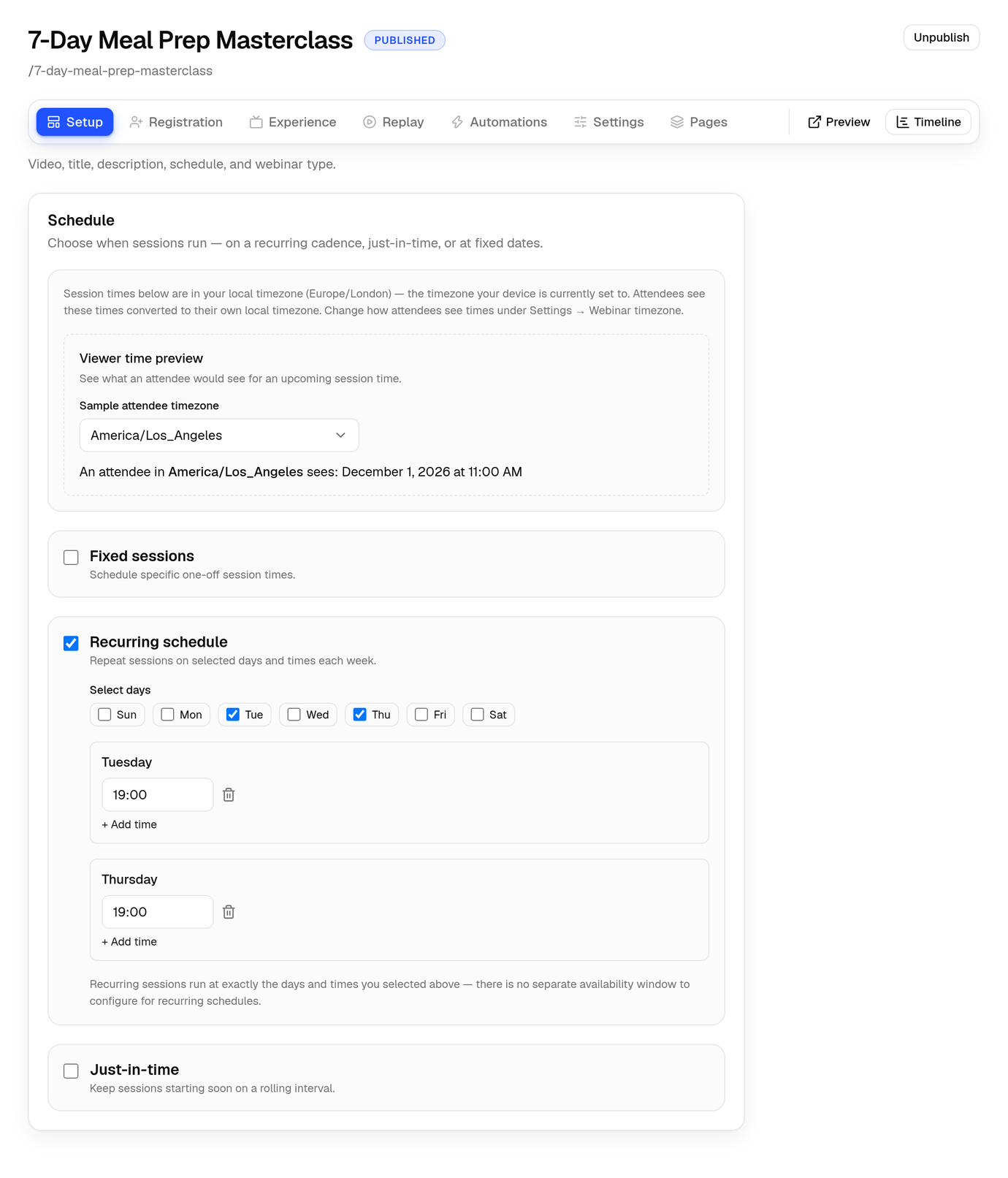
WebinarStack runs automated webinars with recurring and just-in-time scheduling, timed polls and offers on the timeline, and scheduled chat messages. Its automation engine then acts on what each attendee actually did, not on whether they merely attended.
Automations can send an email, send an SMS, call a webhook, or sync the attendee into a connected email platform such as Kit or ActiveCampaign. The triggers that start them include watching a set number of minutes or percent of the video, completing it, clicking an offer, answering a poll, sending a chat message and not showing up. There are 18 triggers in total, of which 13 are based on viewer behaviour and the rest on timing and branching. A viewer who watched 70 percent and clicked the offer can get a different email from one who left at minute five.
If you are comparing tools instead of learning the format, start with the software roundup. The pricing page lists what each plan includes.
Frequently asked questions
- Does an automated webinar have to be pre-recorded?
- Yes, in the ordinary sense of the term. The presentation is recorded once and then played back for each registrant, which is what lets the whole session run without anyone presenting. Some setups mix in a live segment, such as a Q&A held at a fixed time, but a webinar that is presented live every time is a live webinar, not an automated one.
- Are automated webinars the same as evergreen webinars?
- In practice, yes. "Evergreen" describes the goal, a webinar that keeps working without being re-presented, and "automated" describes the mechanism that makes that possible. People use the two words for the same thing. "Automated" is sometimes used more narrowly for the scheduling and follow-up machinery around the recording.
- Do automated webinars convert as well as live ones?
- There is no reliable general figure, and any single number you see is specific to one funnel. The qualitative picture is consistent: automated sessions give up live questions and urgency, and gain attendance, because someone can sign up at any hour and watch within minutes. Test both against your own offer rather than trusting an industry average.
- How long should an automated webinar be?
- Long enough to teach one thing and make one offer, and no longer. A low-priced offer usually needs a shorter session than a high-ticket one, because there is less to explain and less to doubt. Look at your own watch-time data: if most attendees leave before the offer appears, the session is too long or the offer comes too late.
About the author

Founder, WebinarStack
Josh built and ran an online course business that sold through automated webinars. He founded WebinarStack to be the webinar platform he wanted and could not buy.